
Hi Mac users,
some of you reported the “PDFsam is damaged and can’t be opened” error when trying to install the PDF Split And Merge dmg package.
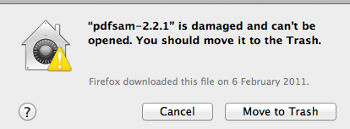
After some investigation and users feedback I can finally write what is causing that. The issue is caused by a new feature of Mountain Lion and OS X Lion v10.7.5, called Gatekeeper which “help protect your Mac from malware and misbehaving apps downloaded from the Internet”. It does that by preventing you from launching apps that are not downloaded from the Mac App Store which is “The safest and most reliable place to download and install apps”. Now, assuming you still want to install PDF Split And Merge even if you didn’t download it from the “safest and most reliable place”, what can you do? You have to:
- Open Gatekeeper settings located in “System Preferences > Security & Privacy”
- Set “Allow applications downloaded from:” to “Anywhere” and confirm by pressing “Allow From Anywhere”
- Launch Pdf Split And Merge
- Once PDF Split And Merge is successfully launched, you can set back Gatekeeper option to whatever you want
Some more information can be found here
You can also control-click the package then select “open” – that way you don’t need to change your security settings.
My PC is Windows 7 64-bit, already downloaded the file needed to install the program PDF Split and Merge, but I’m not found the site necessary to disable security and allow the program downloaded from the internet to work anywhere.
Can you tell me step by step of this operation?
From now on, thank you.
Thank you! Great it worked
Thank you!!!! I love PDFsam and was sad I might be able to use it after switching to a Mac.
Thank you, I love pdfsam!
oh thanks
I tried unlocking the app download on the Gatekeeper, but I still get this message from” The Unarchiver”: The contents of de file “PDFsam_Enhanced_Installer.exe” can’t be extracter by this program. Any help is welcome please!!
Hi Ana, try this, it’s the Mac OS package. https://github.com/torakiki/pdfsam/releases/download/v3.0.1.RELEASE/PDFsam-3.0.1.RELEASE.dmg
Hi
does anyone know if it is possible, when using the split function within pdfsam, to have the split files have different names?
Any tips much appreciated.
Thanks
Here https://pdfsam.org/customize-file-names/ to customize file names
Hi,
Tried to use PDFsam after installing it on my PowerBook Pro with OS 10.6.8, but it crashed again and again! In 10.8 it works just fine.
Any help would be nice!
PS the email-button doesn’t get you any emailadress!
Peter