

<?xml version="1.0" encoding="UTF-8"?><rss version="2.0"
	xmlns:content="http://purl.org/rss/1.0/modules/content/"
	xmlns:dc="http://purl.org/dc/elements/1.1/"
	xmlns:atom="http://www.w3.org/2005/Atom"
	xmlns:sy="http://purl.org/rss/1.0/modules/syndication/"
		>
<channel>
	<title>Comments on: Version 2.1.0 and 2.1.0e</title>
	<atom:link href="http://www.pdfsam.org/?feed=rss2&#038;p=340" rel="self" type="application/rss+xml" />
	<link>http://www.pdfsam.org/?p=340</link>
	<description>Split and merge pdf documents with pdfsam, it's free and open source.</description>
	<lastBuildDate>Thu, 02 Sep 2010 10:51:06 +0000</lastBuildDate>
	<sy:updatePeriod>hourly</sy:updatePeriod>
	<sy:updateFrequency>1</sy:updateFrequency>
	<generator>http://wordpress.org/?v=3.0.1</generator>
	<item>
		<title>By: Dan</title>
		<link>http://www.pdfsam.org/?p=340&#038;cpage=1#comment-35170</link>
		<dc:creator>Dan</dc:creator>
		<pubDate>Tue, 31 Aug 2010 20:50:56 +0000</pubDate>
		<guid isPermaLink="false">http://www.pdfsam.org/?p=340#comment-35170</guid>
		<description>Very good software. Easy to use. Just what I neeeded - or anyone needs.</description>
		<content:encoded><![CDATA[<p>Very good software. Easy to use. Just what I neeeded &#8211; or anyone needs.</p>
]]></content:encoded>
	</item>
	<item>
		<title>By: Dean</title>
		<link>http://www.pdfsam.org/?p=340&#038;cpage=1#comment-35084</link>
		<dc:creator>Dean</dc:creator>
		<pubDate>Tue, 31 Aug 2010 00:10:02 +0000</pubDate>
		<guid isPermaLink="false">http://www.pdfsam.org/?p=340#comment-35084</guid>
		<description>Awesome!</description>
		<content:encoded><![CDATA[<p>Awesome!</p>
]]></content:encoded>
	</item>
	<item>
		<title>By: pat</title>
		<link>http://www.pdfsam.org/?p=340&#038;cpage=1#comment-28983</link>
		<dc:creator>pat</dc:creator>
		<pubDate>Wed, 03 Feb 2010 16:13:48 +0000</pubDate>
		<guid isPermaLink="false">http://www.pdfsam.org/?p=340#comment-28983</guid>
		<description>Hi,

Thanks for creating this very useful product. You know, I spent long time to find this type of freeware on web, so I&#039;d like to to congratulate you.
I use it to mix PDF documents and for the moment, the single problem I had was with PDFfile in version 1.2. Apparently, this PDF version is not supported by &quot;the magic&quot; PDF Sam. However, I process very big files.

Bye and take care.</description>
		<content:encoded><![CDATA[<p>Hi,</p>
<p>Thanks for creating this very useful product. You know, I spent long time to find this type of freeware on web, so I&#8217;d like to to congratulate you.<br />
I use it to mix PDF documents and for the moment, the single problem I had was with PDFfile in version 1.2. Apparently, this PDF version is not supported by &#8220;the magic&#8221; PDF Sam. However, I process very big files.</p>
<p>Bye and take care.</p>
]]></content:encoded>
	</item>
	<item>
		<title>By: andrea.vacondio</title>
		<link>http://www.pdfsam.org/?p=340&#038;cpage=1#comment-28907</link>
		<dc:creator>andrea.vacondio</dc:creator>
		<pubDate>Fri, 29 Jan 2010 12:18:54 +0000</pubDate>
		<guid isPermaLink="false">http://www.pdfsam.org/?p=340#comment-28907</guid>
		<description>You probably need to install the latest version of Java from java.com</description>
		<content:encoded><![CDATA[<p>You probably need to install the latest version of Java from java.com</p>
]]></content:encoded>
	</item>
	<item>
		<title>By: Giorgia</title>
		<link>http://www.pdfsam.org/?p=340&#038;cpage=1#comment-28906</link>
		<dc:creator>Giorgia</dc:creator>
		<pubDate>Fri, 29 Jan 2010 11:55:36 +0000</pubDate>
		<guid isPermaLink="false">http://www.pdfsam.org/?p=340#comment-28906</guid>
		<description>Hi, 
I cannot use this version, it says Sorry, no suitable JRE version found on your system!</description>
		<content:encoded><![CDATA[<p>Hi,<br />
I cannot use this version, it says Sorry, no suitable JRE version found on your system!</p>
]]></content:encoded>
	</item>
	<item>
		<title>By: shidan</title>
		<link>http://www.pdfsam.org/?p=340&#038;cpage=1#comment-28822</link>
		<dc:creator>shidan</dc:creator>
		<pubDate>Sun, 24 Jan 2010 12:39:45 +0000</pubDate>
		<guid isPermaLink="false">http://www.pdfsam.org/?p=340#comment-28822</guid>
		<description>where to download the file?</description>
		<content:encoded><![CDATA[<p>where to download the file?</p>
]]></content:encoded>
	</item>
	<item>
		<title>By: Ble</title>
		<link>http://www.pdfsam.org/?p=340&#038;cpage=1#comment-28775</link>
		<dc:creator>Ble</dc:creator>
		<pubDate>Tue, 19 Jan 2010 07:09:29 +0000</pubDate>
		<guid isPermaLink="false">http://www.pdfsam.org/?p=340#comment-28775</guid>
		<description>where to download?</description>
		<content:encoded><![CDATA[<p>where to download?</p>
]]></content:encoded>
	</item>
	<item>
		<title>By: andrea.vacondio</title>
		<link>http://www.pdfsam.org/?p=340&#038;cpage=1#comment-28659</link>
		<dc:creator>andrea.vacondio</dc:creator>
		<pubDate>Tue, 12 Jan 2010 17:27:04 +0000</pubDate>
		<guid isPermaLink="false">http://www.pdfsam.org/?p=340#comment-28659</guid>
		<description>It&#039;s an iText message and it means that pdf document has some error in its structure. Some times iText is able to repair them but it seems it wasn&#039;t yours. You could try saving a copy of it from Acrobat Reader or another application and merge this copy.</description>
		<content:encoded><![CDATA[<p>It&#8217;s an iText message and it means that pdf document has some error in its structure. Some times iText is able to repair them but it seems it wasn&#8217;t yours. You could try saving a copy of it from Acrobat Reader or another application and merge this copy.</p>
]]></content:encoded>
	</item>
	<item>
		<title>By: andrea.vacondio</title>
		<link>http://www.pdfsam.org/?p=340&#038;cpage=1#comment-28658</link>
		<dc:creator>andrea.vacondio</dc:creator>
		<pubDate>Tue, 12 Jan 2010 17:24:18 +0000</pubDate>
		<guid isPermaLink="false">http://www.pdfsam.org/?p=340#comment-28658</guid>
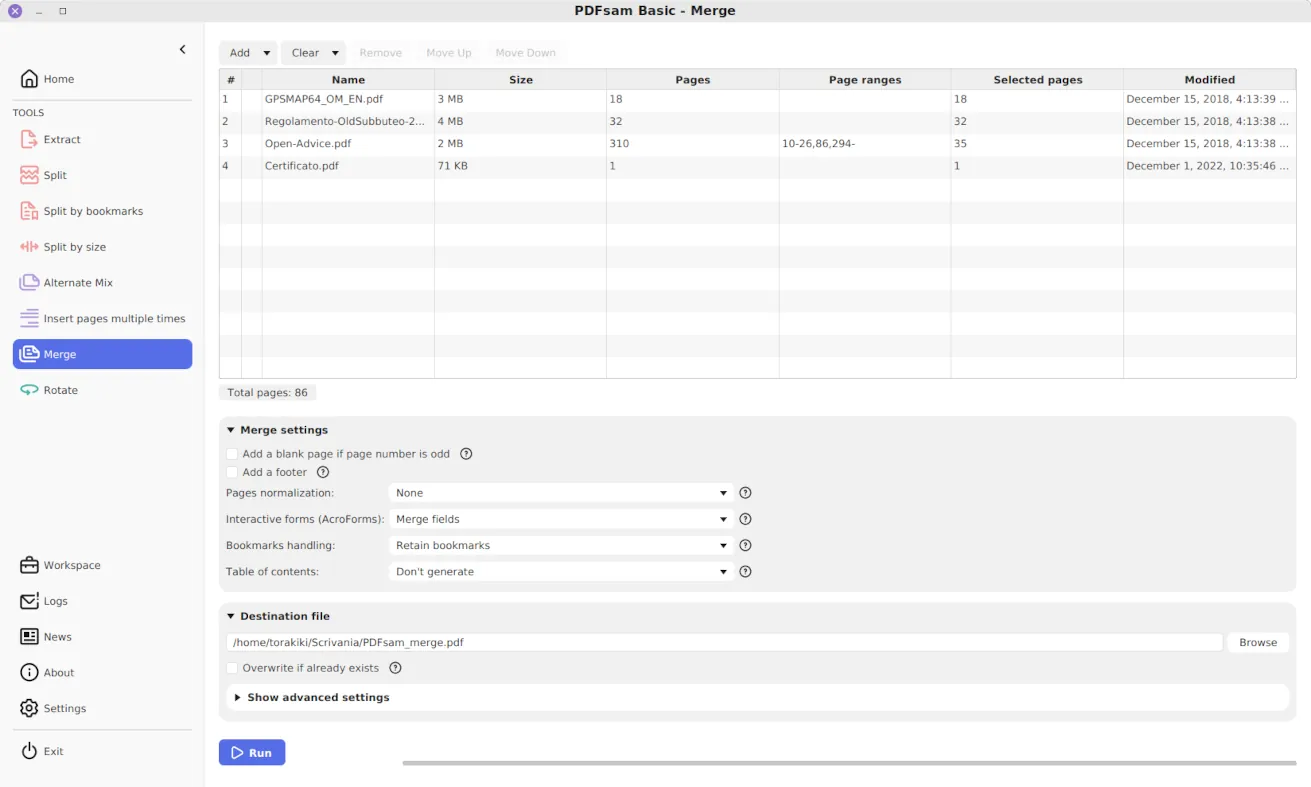
		<description>The Add button should be there. Have you selected the &quot;merge&quot; plugin from the list on the right? I&#039;d need some more information to figure out what is wrong but the merge plugin still works. Can you send me the log messages shown in the log window (bottom window of pdfsam)?</description>
		<content:encoded><![CDATA[<p>The Add button should be there. Have you selected the &#8220;merge&#8221; plugin from the list on the right? I&#8217;d need some more information to figure out what is wrong but the merge plugin still works. Can you send me the log messages shown in the log window (bottom window of pdfsam)?</p>
]]></content:encoded>
	</item>
	<item>
		<title>By: Michael Shott</title>
		<link>http://www.pdfsam.org/?p=340&#038;cpage=1#comment-28657</link>
		<dc:creator>Michael Shott</dc:creator>
		<pubDate>Tue, 12 Jan 2010 17:13:21 +0000</pubDate>
		<guid isPermaLink="false">http://www.pdfsam.org/?p=340#comment-28657</guid>
		<description>Dear Andrea,
I&#039;ve used this before, painlessly, easily.  Now it doesn&#039;t work.

With instructions received in 2009, I easily downloaded a version.  Then I followed the instructions below to merge pdfs:
1. Open pdfsam
2. Click &quot;Add&quot;
3. Choose documents, ordered as in final verson
4. Click &quot;browse&quot; on the &quot;Destination line
5. choose folder, etc.
6. Click &quot;Run&quot;

Worked like a charm.  With the current version I&#039;m stymied at Step 2.  There is no &quot;Add&quot; to click!  I&#039;m swamped, and lack the time to learn a new app right now.  Is there a simple solution to this problem?  If so, what are the step-by-step instructions to do this as easily as I did in the past?  Otherwise it just isn&#039;t worth investing time in something that doesn&#039;t do easily what it professes to do.

Thanks, I hope.

MS</description>
		<content:encoded><![CDATA[<p>Dear Andrea,<br />
I&#8217;ve used this before, painlessly, easily.  Now it doesn&#8217;t work.</p>
<p>With instructions received in 2009, I easily downloaded a version.  Then I followed the instructions below to merge pdfs:<br />
1. Open pdfsam<br />
2. Click &#8220;Add&#8221;<br />
3. Choose documents, ordered as in final verson<br />
4. Click &#8220;browse&#8221; on the &#8220;Destination line<br />
5. choose folder, etc.<br />
6. Click &#8220;Run&#8221;</p>
<p>Worked like a charm.  With the current version I&#8217;m stymied at Step 2.  There is no &#8220;Add&#8221; to click!  I&#8217;m swamped, and lack the time to learn a new app right now.  Is there a simple solution to this problem?  If so, what are the step-by-step instructions to do this as easily as I did in the past?  Otherwise it just isn&#8217;t worth investing time in something that doesn&#8217;t do easily what it professes to do.</p>
<p>Thanks, I hope.</p>
<p>MS</p>
]]></content:encoded>
	</item>
</channel>
</rss>